
Mice | Navidrome Client
> Project based on [shadcn/ui](https://github.com/shadcn-ui/ui)'s music template.
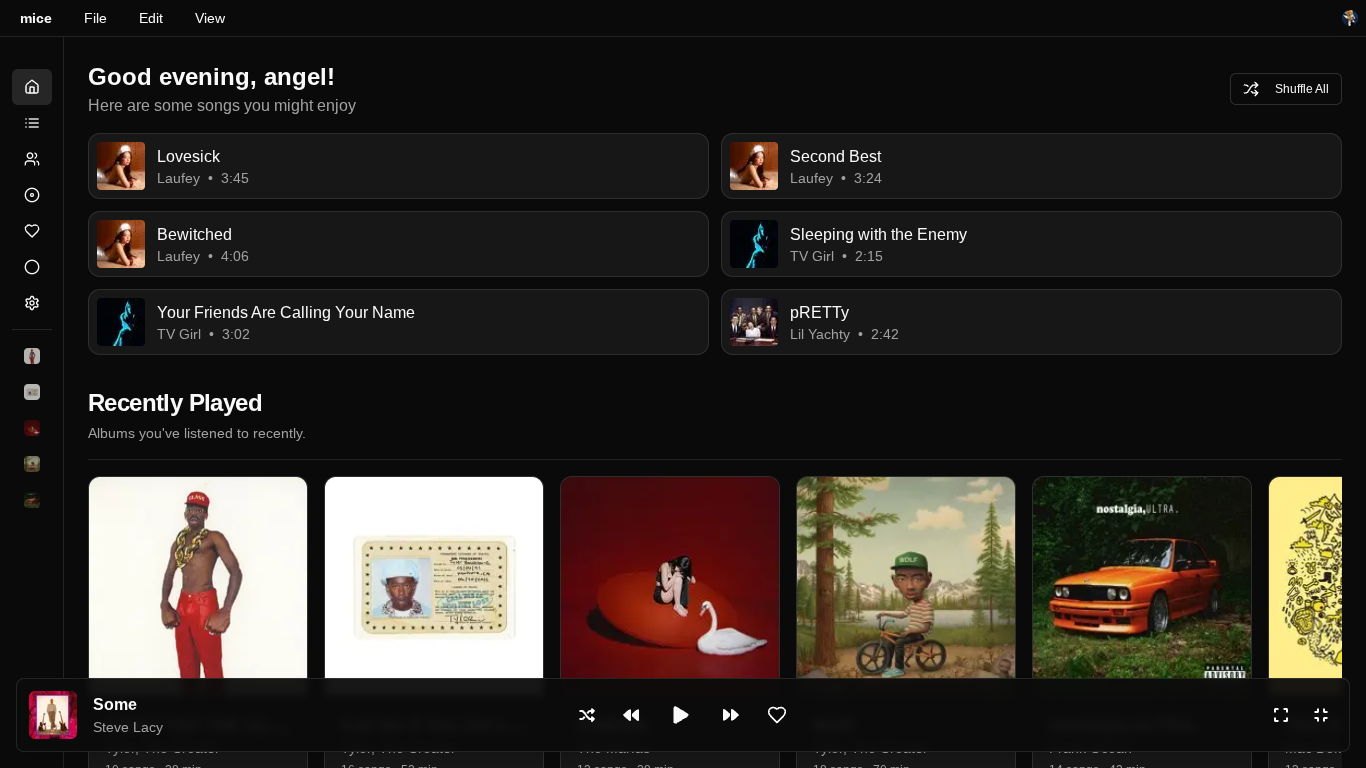
This is a "Modern" Navidrome (or Subsonic) client built with [Next.js](https://nextjs.org/) and [shadcn/ui](https://ui.shadcn.com/). It creates a beautiful, responsive music streaming web application that connects to your Navidrome server, and fully able to self-host using docker!
## Features
- **Real Music Streaming** via Navidrome/Subsonic API
- **Modern UI** with shadcn/ui components
- **Dynamic Album Artwork** from your music library
- **Favorites** - Star albums, artists, and songs
- **Search** - Find music across your entire library
- **Audio Player** with queue management
- **Scrobbling** - Track your listening history
- **Playlist Management** - Create and manage playlists
- **Caching** - Cache/Offline save your server
### Preview
## Quick Start
### Prerequisites
- [Navidrome](https://www.navidrome.org/) server running
- Node.js 18+
### Setup
1. **Clone and install the required dependencies**
```bash
git clone https://github.com/sillyangel/project-still.git
cd project-still/
pnpm install
# or npm
npm install
```
## 2. **Configure the Navidrome connection**
First, copy the example environment file:
```bash
cp .env.example .env
```
Next, open the new `.env` file and update it with your Navidrome server credentials:
```env
NEXT_PUBLIC_NAVIDROME_URL=http://localhost:4533
NEXT_PUBLIC_NAVIDROME_USERNAME=your_username
NEXT_PUBLIC_NAVIDROME_PASSWORD=your_password
NEXT_PUBLIC_POSTHOG_KEY=phc_XXXXXXXXXXXXXXXXXX
NEXT_PUBLIC_POSTHOG_HOST=https://us.i.posthog.com
```
> **Tip:** If you don’t have your own Navidrome server yet, you can use the public demo credentials:
```env
NEXT_PUBLIC_NAVIDROME_URL=https://demo.navidrome.org
NEXT_PUBLIC_NAVIDROME_USERNAME=demo
NEXT_PUBLIC_NAVIDROME_PASSWORD=demo
```
3. **Run the development server**
```bash
pnpm dev
# or npm
npm run dev
```
Open [http://localhost:40625](http://localhost:40625) in your browser.
## Docker Deployment
For easy deployment using Docker:
### Quick Docker Setup
```bash
# Run using pre-built image (app will prompt for Navidrome configuration)
docker run -p 3000:3000 sillyangel/mice:latest
# Or build locally
docker build -t mice .
docker run -p 3000:3000 mice
```
### Docker Compose (Recommended)
```bash
# Copy environment template and configure
cp .env.docker .env
# Edit .env with your settings (optional - app can prompt)
docker-compose up -d
```
### Pre-configured Docker Run
```bash
docker run -p 3000:3000 \
-e NEXT_PUBLIC_NAVIDROME_URL=http://your-navidrome-server:4533 \
-e NEXT_PUBLIC_NAVIDROME_USERNAME=your_username \
-e NEXT_PUBLIC_NAVIDROME_PASSWORD=your_password \
sillyangel/mice:latest
```
**For detailed Docker configuration, environment variables, troubleshooting, and advanced setups, see [DOCKER.md](./DOCKER.md)**
## Tech Stack
- **Frontend**: Next.js 15, React 19, TypeScript
- **UI**: shadcn/ui, Tailwind CSS, Radix UI
- **Backend**: Navidrome (Subsonic API compatible)
- **Audio**: Web Audio API with streaming
- **State**: React Context for global state management
## License
This project is licensed under the MIT License.
## Acknowledgments
- [shadcn/ui](https://ui.shadcn.com/) for the beautiful UI components
- [Navidrome](https://www.navidrome.org/) for the amazing music server
- [Subsonic API](http://www.subsonic.org/pages/api.jsp) for the API specification